Authenticated Content and Protected Routes
Last updated: May 5, 2026
This guide is based on Next.js and Uniform App Router v20 and above
The problem
A CMS-driven website often needs to serve a mix of public and private content. Some pages are open to everyone, some should only be visible to logged-in users, and even on public pages the experience may need to change depending on who is viewing it. These requirements create three distinct challenges:
Personalizing public content for authenticated users -- A public page (e.g. a marketing landing page) may need to show different calls-to-action, pricing, or messaging depending on whether the visitor is logged in and what attributes they carry (role, brand, account status, etc.). The page itself is not restricted, but its content adapts.
Protecting private content on otherwise public routes -- A single page may contain a mixture of public and private sections. For example a product page might be visible to everyone but include an "order now" panel that should only render for authenticated users. The route is not protected, but individual content blocks within it are.
Protecting entire routes -- Certain paths (e.g.
/my-accountand everything beneath it) must be completely inaccessible to unauthenticated visitors. Any request to these paths should redirect to the login flow before the page ever renders.
Solving all three in a CMS-managed, multi-locale Next.js application introduces additional complexity:
CMS authors, not developers, control which pages are protected. The list of protected routes must update automatically when a content author publishes or unpublishes a page with an
accessTypeparameter in Uniform.Protection must happen at the edge, before page code runs. Relying solely on client-side checks would leak markup and data to unauthenticated visitors.
The protected-route list must be fast to read on every request. Fetching from the CMS on every page load would be too slow.
Content authors need to preview protected pages inside the Uniform visual editor without being blocked by authentication.
How the solution is structured
The implementation addresses each layer with a different mechanism:
Layer | Mechanism | Where it runs |
|---|---|---|
Personalized public content | Uniform quirks ( | Quirks; are run on both client and server side. They are visible in cookies. |
Private content blocks | The | Server-side component rendering. |
Protected routes | Middleware checks every request against a list stored in Vercel Edge Config. If the route matches and the user has no session, middleware redirects to | Next.js middleware (edge runtime). |
Architecture

Personalizing public content with quirks
Quirks let Uniform's built-in personalization engine vary content based on visitor attributes. To personalize for authenticated users, pass an authenticated quirk from middleware so that CMS authors can create personalization rules against it.
In this example, Uniform is is controlling visibility of variants rather than adding content which is personal to an individual user.
Passing quirks from middleware
// src/middleware.ts (simplified)

const user = await getDisplayUserFromRequest(req);

return uniformMiddleware({
  quirks: {
    authenticated: String(!!user),  // "true" or "false"
  },
  locale,
  // ...
})(req);
Quirk values are always strings. Booleans must be converted with String(!!value). Uniform will not coerce types for you, passing a raw boolean will silently fail to match personalization criteria.
Registering the quirk in your Uniform project
No additional code changes are needed, Uniform's personalization components will pick up the quirk automatically. However you must register the quirk in your Uniform project so that CMS authors can build rules against it:
In the Uniform dashboard, go to Personalization > Quirks
Add a quirk with the key
authenticatedand valuestrue/falseAuthors can then use this quirk as criteria in personalization components to show different content variants depending on login status
See the Uniform quirks documentation for full setup details.
How this differs from the other layers
Quirks are stored in cookies and evaluated on both the client and server. This makes them suitable for personalizing public content (e.g. swapping a CTA) but not for protecting private content.
The cookie values are visible in the browser and a motivated user could forge them. For content that must not be visible to unauthenticated users, use the AuthContainer (keys) or protected routes (middleware redirect).
AuthContainer -- private content blocks on public pages
The AuthContainer is a Uniform component with two slots: authorized and unauthorized. It decides which slot to render based on a key that middleware sets on every request.
How the key gets set
In middleware, when calling uniformMiddleware, we pass a keys object that includes the user's authentication status. Uniform makes these keys available to components via context.pageState.keys.
// src/middleware.ts (simplified)

const user = await getDisplayUserFromRequest(req);

return uniformMiddleware({
  locale,
  rewriteRequestPath: async ({ url }) => ({
    path: url.pathname,
    keys: {
		  authenticated: String(!!user),  // "true" or "false"
	},
  }),
  // ...
})(req);
The important part is authenticated: String(!!user). This converts the user session into a simple "true" / "false" string that travels with the request through Uniform's rendering pipeline.
How the component reads the key
The AuthContainer component checks context.pageState.keys.authenticated and renders the corresponding slot:
// src/components/AuthContainer.tsx

const AuthContainer: FC<AuthContainerProps> = ({ slots, context }) => {
  return context.pageState.keys?.authenticated === 'true' ? (
    <UniformSlot slot={slots.authorized} />
  ) : (
    <UniformSlot slot={slots.unauthorized} />
  );
};
Why keys instead of quirks?
Uniform quirks are designed for personalization -- they are stored in cookies and visible to the client. Keys are request-scoped metadata that Uniform makes available during server-side rendering but does not expose to the browser. This makes keys the right choice for auth-gated content where you do not want the decision criteria to leak to the client.
Protected routes -- blocking entire paths
Protected routes prevent unauthenticated visitors from reaching a page at all. Unlike quirks and keys which affect what renders on a page, this layer redirects the browser to the login flow before any page code runs.
How accessType maps to an Access Config
Each composition in Uniform can have an accessType parameter. When the webhook rebuilds the protected routes list, it converts each composition's accessType into an access config stored in Edge Config.
The Access Config stores the path and whether to consider itself or children public or private.
For a composition mapped to the path /dashboard:
| ||
|---|---|---|
| (none) | Nothing -- the route is public |
|
| Explicitly public, no protection |
|
| The exact path is protected but not descendants |
|
| All descendants, but NOT |
|
| The exact path AND all descendants |
How the middleware enforces protection
On every request, middleware reads the user's session and checks the pathname against the stored access configs. The checkProtectedRouteAccess function handles this decision.
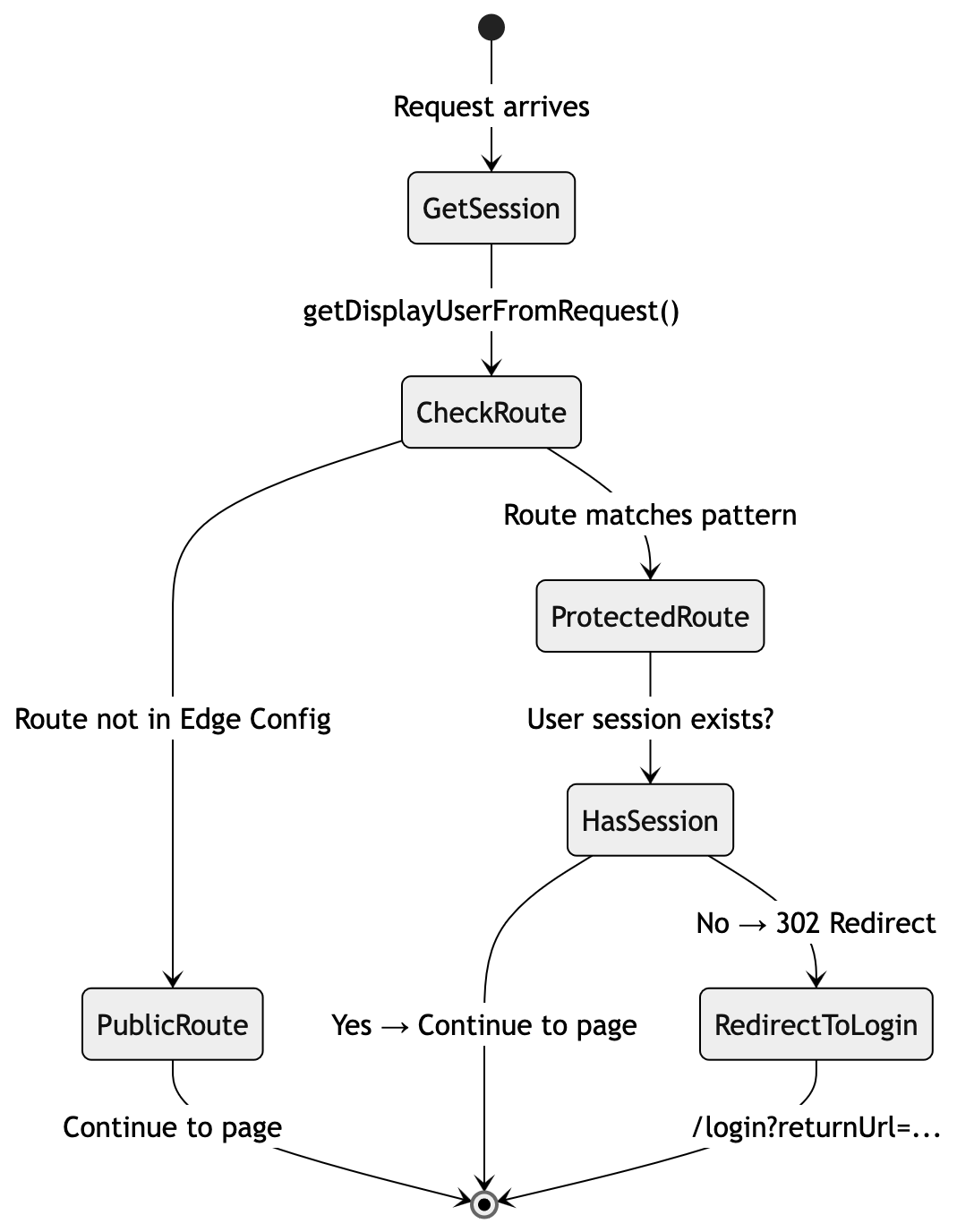
The middleware code that orchestrates this:
// src/middleware.ts (simplified)

const user = await getDisplayUserFromRequest(req);
const { loginRedirectPath, headers } = await checkProtectedRouteAccess(req, user);

if (loginRedirectPath) {
  return NextResponse.redirect(new URL(loginRedirectPath, req.url), { headers });
}

// Continue to Uniform middleware and page rendering...
The redirect includes a returnUrl parameter so the login flow can send the user back to their original destination after authentication.
Supporting the Canvas visual editor
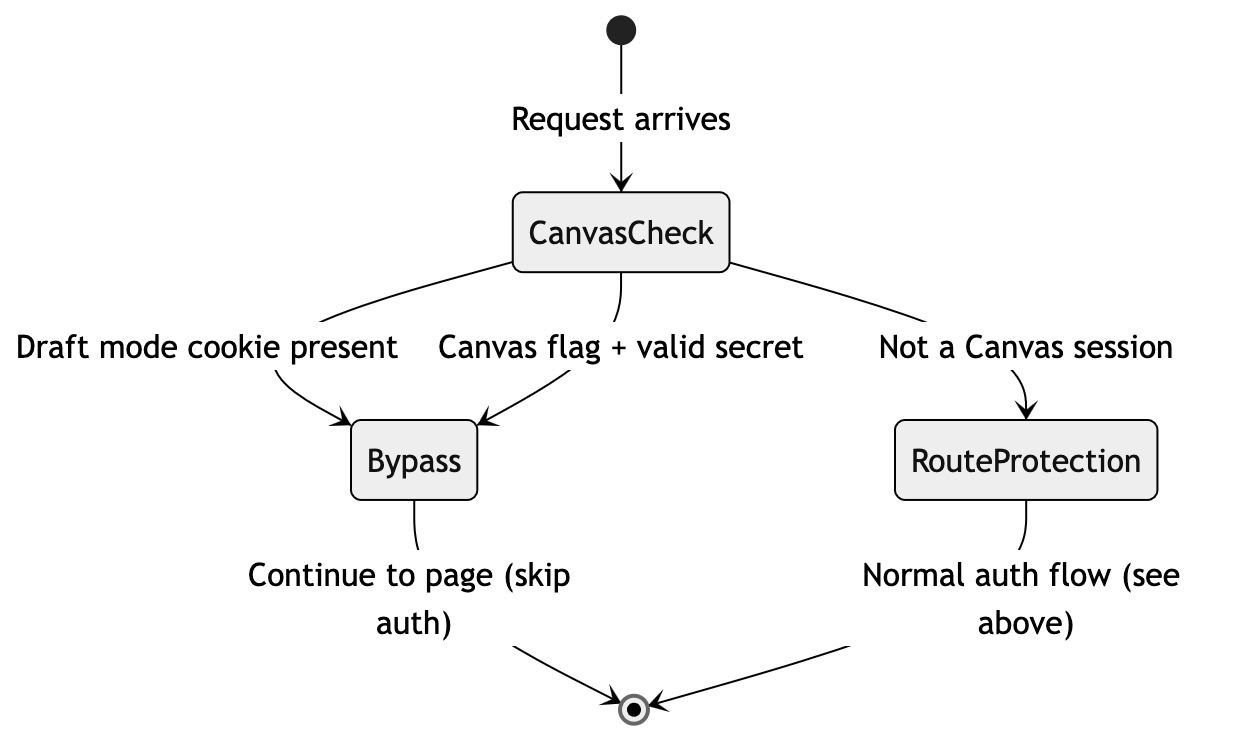
Content authors need to preview protected pages inside Uniform's Canvas editor without being blocked by the login redirect. The auth check must be bypassed for editing sessions, but only when we can verify the request genuinely comes from Canvas.
When an author opens a protected page in Canvas, the site loads inside an iframe. Without special handling, middleware would see an unauthenticated request to a protected route and redirect to the login page -- breaking the editing experience.
Two verification methods
The bypass uses two independent checks. Either one is sufficient to grant access:
Draft mode cookie -- When Canvas initialises, it calls the
/api/previewroute which sets a__prerender_bypasscookie. This is an HTTP-only cookie managed by Next.js, making it the most secure method. It persists across page navigation within the Canvas session.Canvas query parameters + secret -- Canvas adds
is_incontext_editing_mode=trueto the URL. We pair this with asecretparameter that must match theUNIFORM_PREVIEW_SECRETenvironment variable. Both must be present -- the editing flag alone is not enough.
Why two methods? When navigating between pages inside Canvas, query parameters may not persist on every request. The draft mode cookie covers those cases. The query parameter check covers the initial Canvas load before the cookie is set.
// src/lib/auth/middleware-helpers.ts (simplified)

export async function checkProtectedRouteAccess(req, user) {
  const searchParams = req.nextUrl.searchParams;

  // Method 1: Draft mode cookie (set by /api/preview)
  const hasDraftMode = !!req.cookies.get('__prerender_bypass');

  // Method 2: Canvas editing flag + valid secret
  const isCanvasEditing = searchParams.get('is_incontext_editing_mode') === 'true';
  const hasPreviewSecret = searchParams.get('secret') === process.env.UNIFORM_PREVIEW_SECRET;

  // Either method grants access to all routes
  if (hasDraftMode || (isCanvasEditing && hasPreviewSecret)) {
    return { canAccess: true };
  }

  // Otherwise, enforce normal route protection...
}
Updated state diagram
With the Canvas bypass, the full decision flow looks like this:
Setup requirements
For this to work you need:
A
UNIFORM_PREVIEW_SECRETenvironment variable set in both your hosting environment and the Uniform project's preview configurationThe
/api/previewroute handler configured (see the Uniform App Router documentation for the standard setup)
Webhook -- keeping the route list in sync
The protected routes list must update automatically when CMS authors publish or delete pages. A Uniform webhook triggers this by calling an API route in the application, which fetches the current set of protected compositions and writes them to Edge Config.
Before implementing this, read the Uniform webhooks guide to understand webhook setup, secret verification, and event types.
Webhook handler overview
The webhook API route at /api/webhooks/uniform receives composition events from Uniform. When a relevant event arrives, the handler:
Verifies the request using the
uniform-secretheader against theUNIFORM_PREVIEW_SECRETenvironment variableChecks the event type is a composition publish or delete
Fetches all protected compositions from Uniform and rebuilds the route list
Writes the updated list to Edge Config
The handler responds immediately and processes the update in the background using waitUntil() so Uniform does not time out waiting for a response.
Debouncing: When a CMS author or sync CLI publishes several pages in quick succession, each publish fires a separate webhook. It is recommended to include a debounce to avoid redundant Edge Config writes. The details of this mechanism are beyond the scope of this guide.
Fetching protected routes from Uniform
The core of the webhook is fetchProtectedRoutes(). This queries the Uniform canvas client for all compositions that have an authenticated accessType, then maps each one to an access config. It breaks down into three steps.
1. Define default routes
Some routes may always be protected regardless of what is in the CMS. These act as a fallback if Edge Config is unavailable and as a baseline that the webhook merges CMS-driven routes into.
export const DEFAULT_PROTECTED_ROUTES: string[] = [
  { path: '/my-account', self: 'private', children: 'private' }
];
2. Convert accessType to Access Config
Each composition's accessType value maps to one or more route patterns. This function handles the conversion.
function getAccessRuleByAccessType(path: string, accessType?: string): RouteAccessRule | null {
  switch (accessType) {
    case ACCESS_TYPES.Public:
      return { path, self: 'public', children: 'public' };
    case ACCESS_TYPES.AuthenticatedChildRoutes:
      return { path, self: 'public', children: 'private' };
    case ACCESS_TYPES.AuthenticatedRoute:
      return { path, self: 'private', children: 'public' };
    case ACCESS_TYPES.AuthenticatedRouteAndChildren:
      return { path, self: 'private', children: 'private' };
    default:
      return null;
  }
}
3. Query Uniform and build the full list
fetchProtectedRoutes() queries the canvas client for compositions matching the authenticated access types, looks up each composition's path from the project map, and converts them to route patterns.
const ACCESS_TYPE_PARAMETER = 'accessType';
const ALLOWED_PAGE_TYPES: string[] = [
  'GeneralPurposePage',
  'ProductDetailPage'
];

/*
 * Builds the full route access rule list from Uniform compositions
 */
export async function fetchAccessConfig(): Promise<RouteAccessRule[]> {
  try {
    const result = (
      await Promise.all(
        ALLOWED_PAGE_TYPES.map(type =>
          getFullCompositionList({
            filters: {
              [`type[eq]`]: type,
              [`parameters.${ACCESS_TYPE_PARAMETER}[def]`]: true,
            },
          })
        )
      )
    ).flat();

    const rulesMap = new Map<string, RouteAccessRule>();

    for (const member of result) {
      const { composition } = member;

      const route = await projectMapClient.getNodes({
        compositionId: composition._id,
      });

      const { accessType } = getAccessType(composition);

      for (const node of route.nodes ?? []) {
        const pathname = node.path;

        if (typeof pathname !== 'string') {
          continue;
        }

        const normalizedPath = normalizePath(pathname);
        const rule = getAccessRuleByAccessType(normalizedPath, accessType);

        if (!rule) {
          continue;
        }

        rulesMap.set(normalizedPath, rule);
      }
    }

    // Include any default rules as long as they don't already exist
    for (const rule of DEFAULT_ACCESS_CONFIG) {
      const normalizedPath = normalizePath(rule.path);
      if (!rulesMap.has(normalizedPath)) {
        rulesMap.set(normalizedPath, rule);
      }
    }

    return Array.from(rulesMap.values());
  } catch (error) {
    console.error('Error fetching route access rules:', error);
    return DEFAULT_ACCESS_CONFIG;
  }
}
The query uses two filters: type[eq] restricts to a specific composition type, and parameters.accessType[def] limits results to compositions with an access type set. For each matching composition, projectMapClient.getNodes() resolves the composition ID to its URL path in the project map.
The composition type filter is page-type specific. The type[eq] filter targets a single composition type (GeneralPurposePage in this example). If your project has multiple composition types that support the accessType parameter, you must run the same query for each type and merge the results. The Uniform canvas client does not support querying across composition types in a single call