Enabling Uniform for Mobile Applications
Last updated: June 22, 2026
Problem Statement
Organizations need to deliver personalized content, A/B tests, and composable digital experiences across both web and native mobile applications. However, many experience orchestration solutions are implemented primarily for web channels, making it difficult to reuse composition, personalization, and experimentation capabilities in mobile environments. This creates additional complexity, increases development costs, and slows the delivery of consistent omnichannel experiences
Solution
Option 1: With the SDK (React Native)
Repository: Uniform Mobile Demo
Install the SDK: add the Uniform SDK as a dependency in your React Native project.
Set up the project: clone the mobile demo repository — a starter template for integrating Uniform with React Native.
Define components: set up components like in a standard React application, using Uniform Composition to load content.
Run the application: test on local machines or emulators. The project comes pre-configured with Metro; add Expo to generate a web version for Uniform preview.
Data flow:
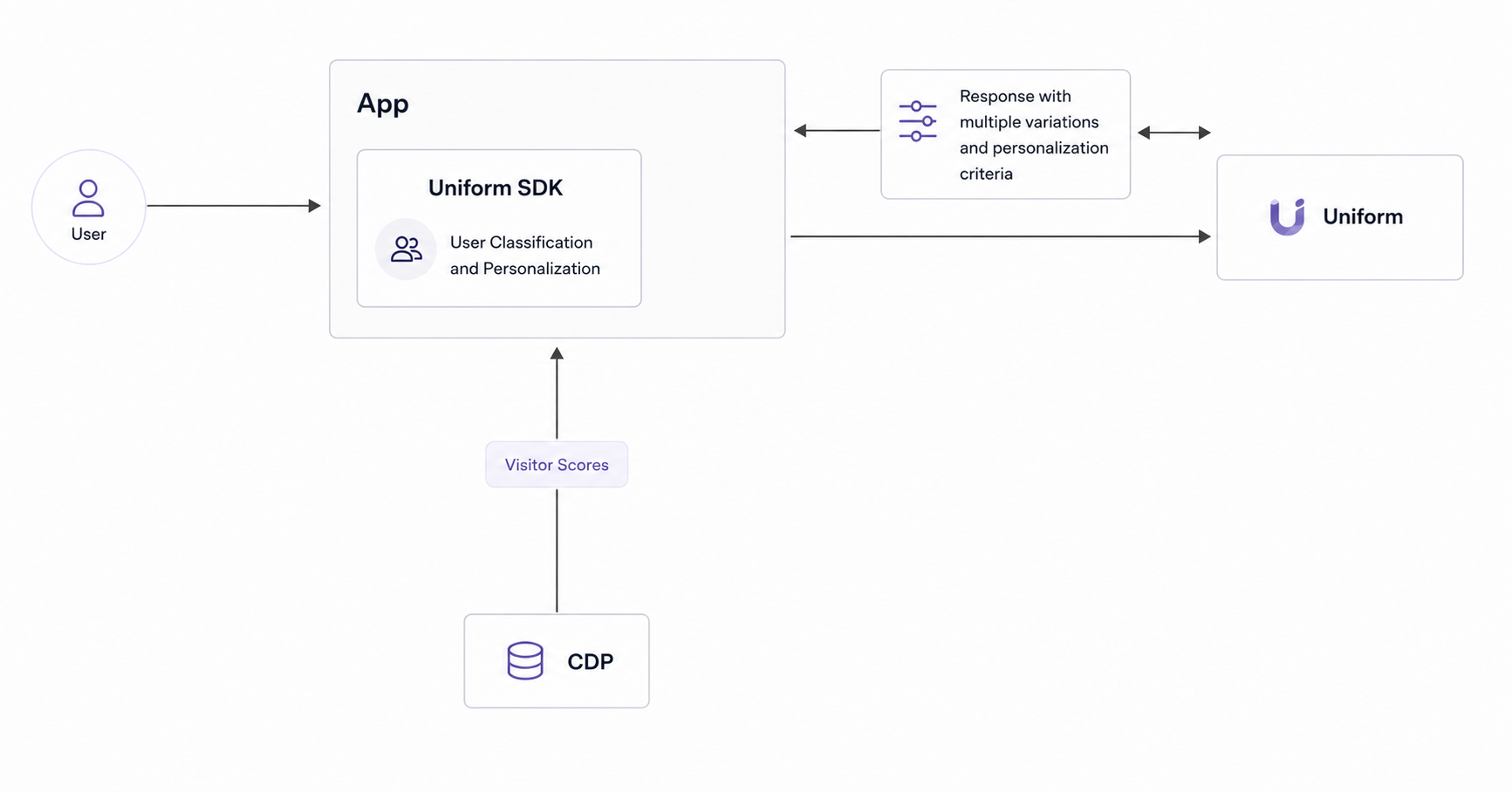
Pros:
Ease of Integration: Direct integration with React Native environments.
Feature Rich: Benefit from all SDK features for personalization and A/B testing.
Preview: Requires web version for Preview that can be achieved with the same codebase using tools like Expo
Cons:
Framework options: Currently only available for React Native. Support for other mobile technology can be added on demand, contact us to discuss.
Option 2: SDK-Free (API Middleware)
Self-host a middleware that retrieves composition JSON and runs personalization and A/B testing at the API boundary, so any consuming application can use it. The client sends context (visitor ID or profile data) via HTTP headers, which initialize Uniform quirks for personalizing on behavior, geo, and CDP data.
Repositories:
Cloudflare hosted: Context as a Service – Cloudflare
Akamai hosted: Context as a Service – Akamai
Set up the middleware worker: deploy a worker on Cloudflare or Akamai to proxy Uniform's global API requests.
Add middleware logic: handle requests, append quirks, get scores from your CDP, and manage personalization based on visitor quirks and signals; use Uniform context to deliver a personalized response.
Set up preview: build a separate web application for previews in the Canvas editor — native previews are not directly supported.
Data flow:
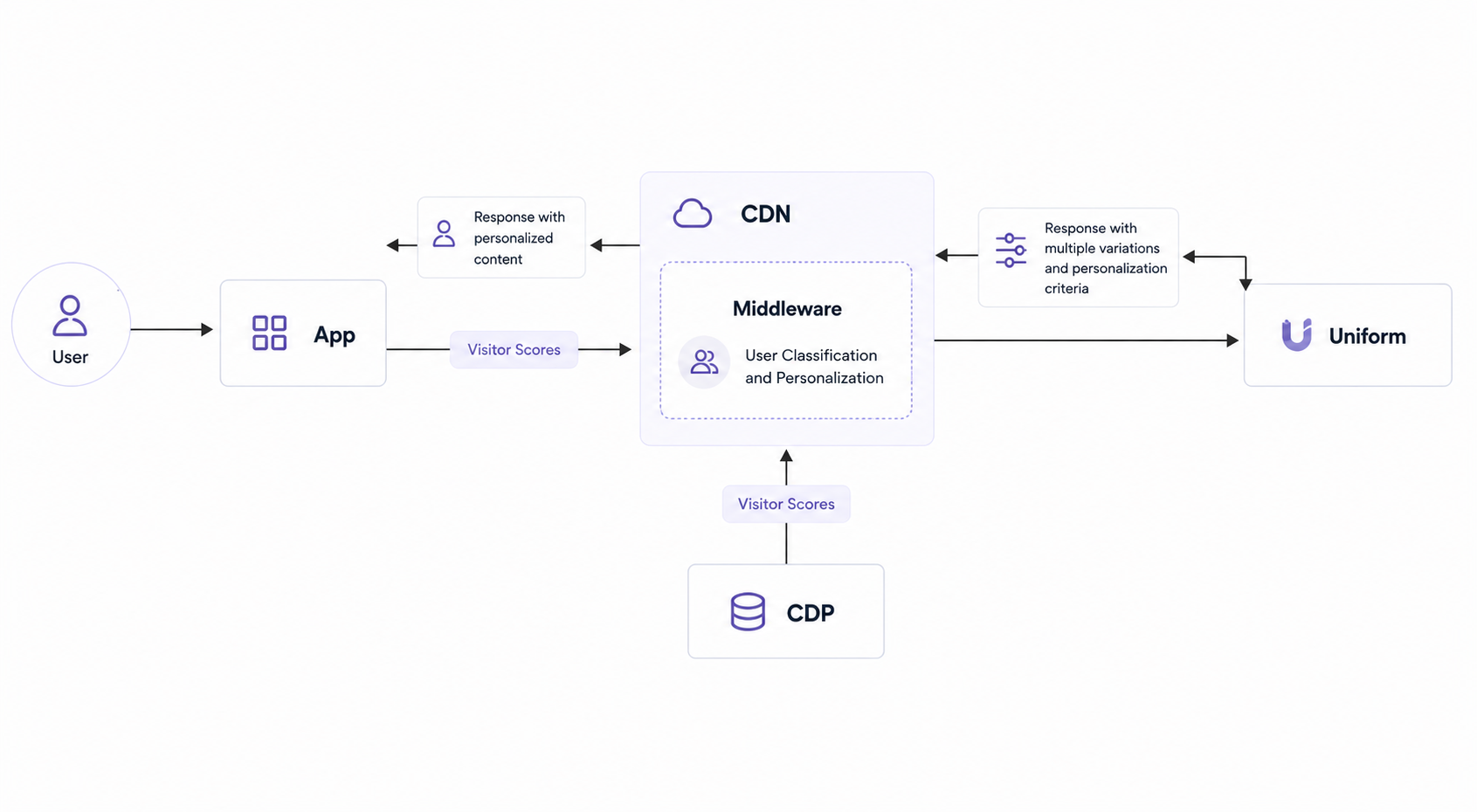
Pros:
Platform Flexibility: Works with any serverless platform offering edge worker capabilities.
Customizable: Allows for intricate personalization logic and retrieval of customer data from your own CDP or profile API.
Cons:
Additional setup required: Requires additional middleware configuration and a separate application for previewing in Uniform's Canvas Editor.
Manual API output mapping: in contrast with SDK assisting in mapping data to components, you will need to do it yourself.
Preview Limitations: Requires extra app for previewing.
Which to choose:
SDK: projects that benefit from Uniform's full feature set and can run React Native web previews.
SDK-free: teams needing flexible architecture or building with Native/Flutter/Kotlin/Xamarin; extra work is needed for Canvas editor compatibility.
Troubleshooting
Verify it works: run the app on a local machine or emulator and confirm composition content loads; for the SDK-free option, confirm the worker returns personalized composition JSON for requests with context headers.
No preview in Canvas: native previews are not supported — provide a web version (Expo for React Native, or a separate web app for the SDK-free option).
Using Flutter/Kotlin/Xamarin: the SDK is React Native only; use the SDK-free middleware approach, or contact Uniform support.