Classify content automatically with Jev and Uniform Automations
Last updated: October 3, 2026
Personalization depends on knowing what every piece of content is about. This article shows how to keep that knowledge current automatically. Whenever a composition or entry is saved, a Uniform Automation asks Jev, a System One model, to score the content against your enrichments, and writes the result back as enrichment tags.
It starts with the concepts: why classification suits a System One model, and why Automations are the right place to run it. The how-to with code comes after.
In this article
The problem: enrichment tags drift
Why a System One model, not an LLM
Why not Scout
Why Uniform Automations
How it works
Compositions and entries
How-to: build it
Verify, troubleshoot and limits
Learn more
1. The problem: enrichment tags drift
Uniform builds a visitor profile from enrichment tags. Each tag on a composition or entry says "this content is about Platform Engineering, strength +30". As visitors read, their scores add up, and personalization and AI tailoring act on those scores.
The profile is only as good as the tags, and hand-tagging has three problems:
It doesn't scale. Every page and entry needs a decision for every enrichment value.
It's inconsistent. Two authors tag the same kind of article differently.
It goes stale. Copy gets rewritten but the tags stay as they were. A page that has moved from engineering detail to business outcomes keeps enriching visitors as engineers.
Tags should be derived from the content and recomputed whenever the content changes.
2. Why a System One model, not an LLM
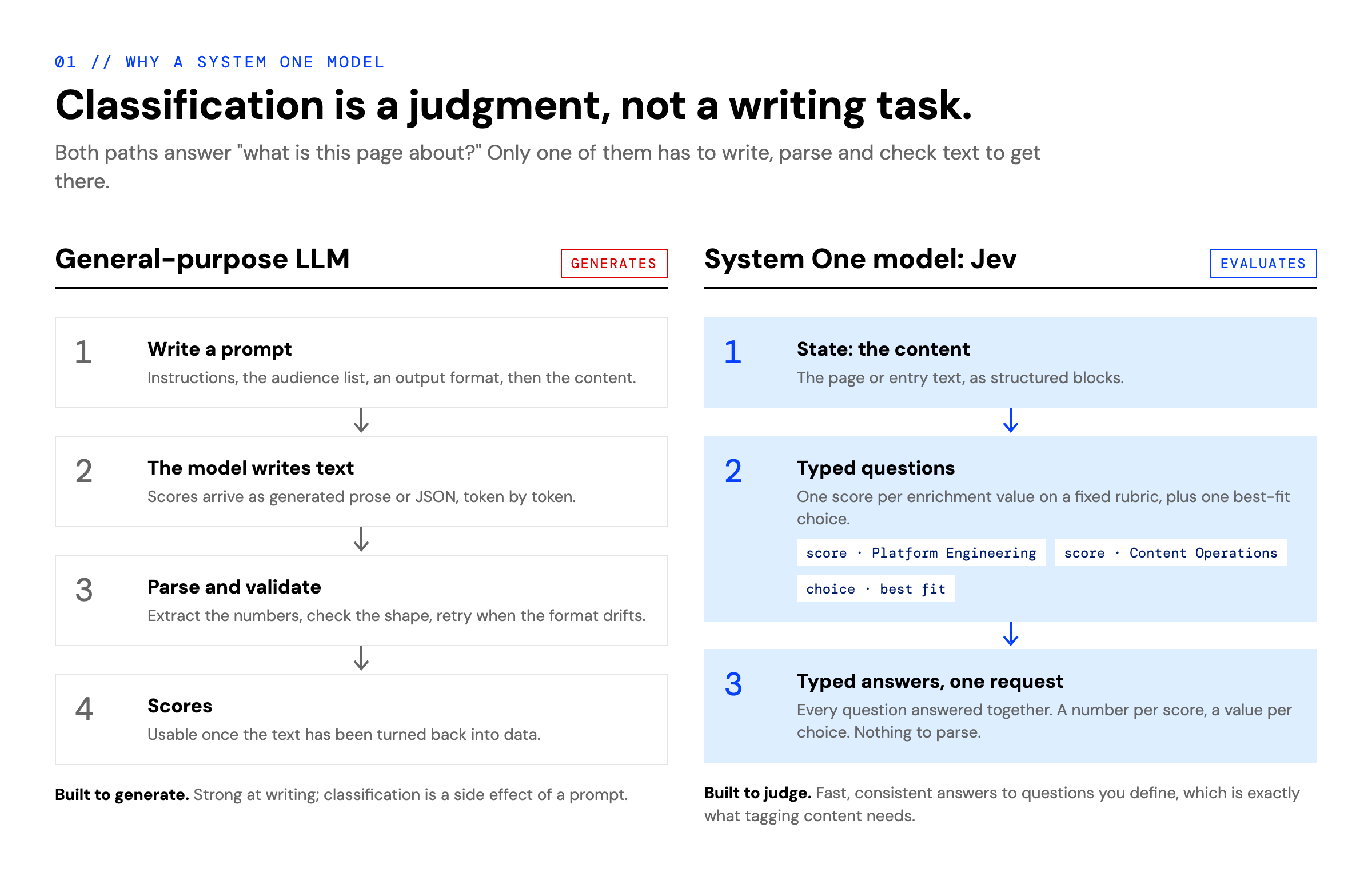
Psychologists describe two modes of thinking. System 2 is slow and deliberate: reasoning, planning, writing. System 1 is fast and intuitive: recognizing at a glance what something is.
Classifying content is a System 1 task. An editor skimming an article doesn't reason their way to "this is for platform engineers", they recognize it. Large language models are built for System 2 work: they generate text. Using one to classify means:
writing a prompt that describes the audiences and an output format;
having the model write its answer, token by token;
parsing that text back into numbers, validating it, and retrying when the format drifts.
Jev (typesafe-ai/jev on the Vercel AI Gateway) is a System One model. It doesn't write text: it answers typed questions about a piece of content.
You give it the content as state.
You give it questions, each with a fixed type: a score on a rubric you define, or a choice from a set of options.
It answers all of them in one request, with a number for each score and a value for each choice.
For classification that means one score question per enrichment value ("how relevant is this to Platform Engineering?") on a four-step rubric (irrelevant, tangential, relevant, core), plus one choice question for the single best fit. There is no output format to enforce and no text to parse. Answers are consistent from run to run, because the model judges against the rubric instead of improvising a response.
General-purpose LLM | System One model (Jev) | |
|---|---|---|
What it's built for | Writing and reasoning | Judging content against defined questions |
What you get back | Text that you parse into data | Typed answers: scores and choices |
Questions per request | Whatever you fit into one prompt | Many typed questions, answered together |
Failure modes | Format drift, retries, inconsistent numbers | Answers are always the shape you asked for |
Fit for tagging | Possible, with scaffolding | Exactly the job |
3. Why not Scout
Scout, Uniform's AI agent, can set enrichment tags too: you can ask it to review a composition and tag it. That suits one-off, judgment-heavy edits where you want an agent to reason, use tools and explain itself.
For classification that runs on every save, an agent is more than the job needs:
It's slower. An agent plans, calls tools, reads the result and writes changes back, one step at a time. Jev answers every score in a single request.
It's less efficient. Scout runs consume AI credits on each run and use a general model to do a narrow task. Jev is purpose-built for exactly this kind of scoring.
It's less predictable. An agent decides how to carry out its instructions each time. Here the steps are fixed (read, score, map to strengths, write), so they belong in code, with the model used for the one step that needs judgment.
The Automations skill recommends the same split: use plain code for deterministic work and reach for AI only where the task needs judgment. Here that judgment step is a single call to a model built for it.
4. Why Uniform Automations
Uniform Automations are serverless functions that Uniform runs on your behalf when something happens in your project: a content event, a schedule, an incoming webhook, or a call from Scout. You write them in TypeScript in your repository and deploy them with the Uniform CLI.
For classification, Automations give you the property that matters most: the operation runs every time a composition or entry is saved, so tags always reflect the current copy. They also bring:
Nothing to host. Code runs in Uniform's sandbox. There is no webhook endpoint to deploy, secure or keep running.
Authors never wait. Runs are asynchronous. The save completes immediately and classification happens straight after.
Built-in loop protection. When the automation saves the tags back, that save would normally trigger it again. Uniform recognizes the automation's own writes and suppresses them, recording the suppressed run as
cycleAborted.Scoped credentials. Each run gets short-lived credentials for a role you choose, not a long-lived API key.
Secrets and logs. Secrets are injected through
UNIFORM_ENV_*variables, and every run is visible in the run history with its logs.
Classifying when content is saved also removes the cost from page requests: the site never calls a model to render a page. Uniform applies the tags as part of its normal tracking when a visitor views the content.
5. How it works
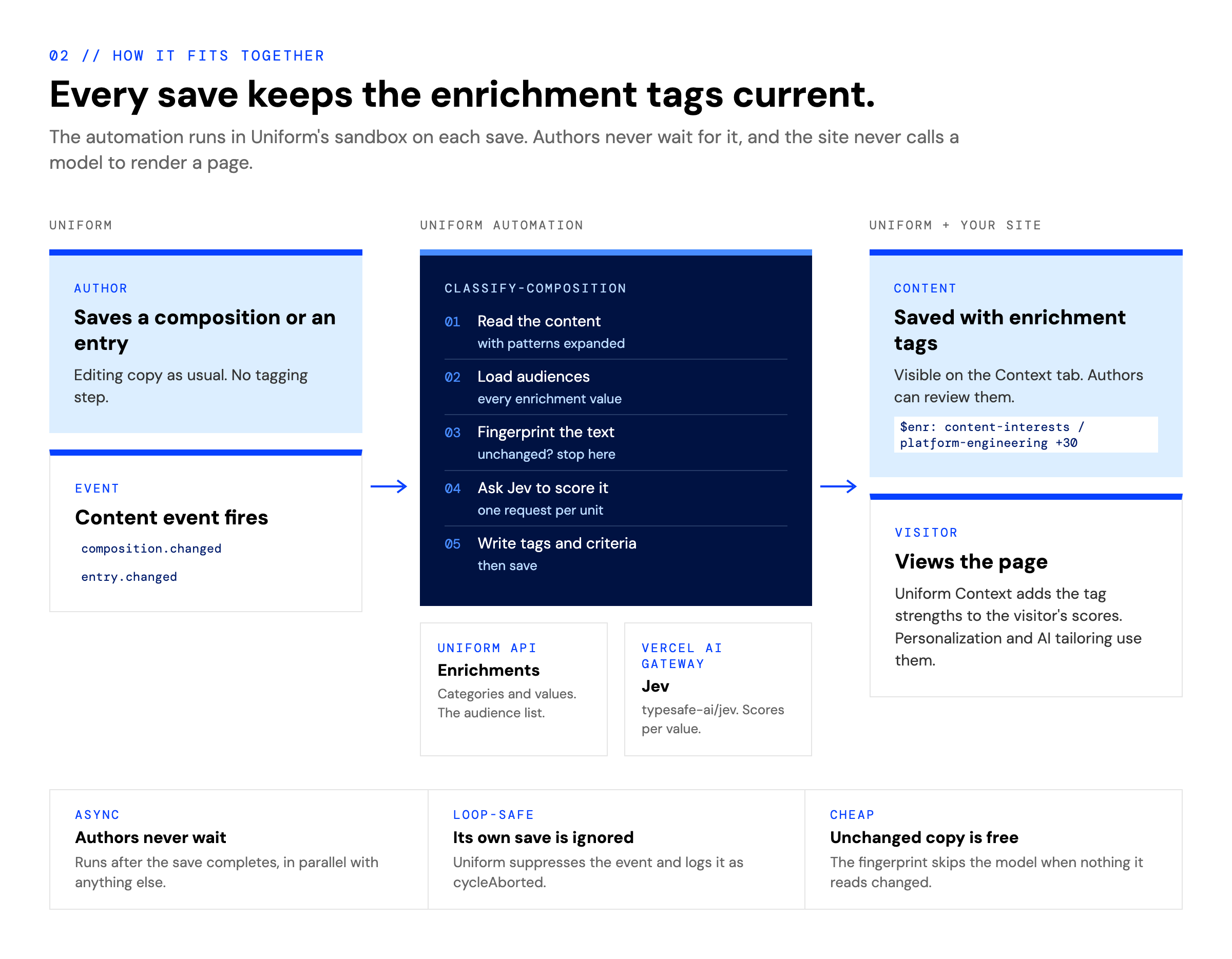
An author saves. Uniform raises
composition.changed(orentry.changedfor entries).The automation reads the content. Compositions are read in the editor format, so content coming from patterns is included and the result is still safe to save back.
It loads the audiences from Uniform. Every value of every enrichment category, from the Enrichments API. Nothing is hardcoded: add a category or value in Uniform, and the next save classifies against it.
It fingerprints the text. If nothing Jev would read has changed, it stops here.
Jev scores the content against every enrichment value, in one request per unit (the page, plus each personalization variant separately).
It writes the results: the enrichment tags, each personalization variant's criteria pointed at the audience it's written for, and the new fingerprint. Then it saves.
Visitors view the content.
UniformCompositionapplies the tags, and the visitor's scores go up.
What Jev reads
What you send to the model decides what the score means. The automation collects prose, and skips content that would misrepresent what a visitor actually read:
Skipped | Why |
|---|---|
Teasers: cards, stats, calls to action | A list of links names every topic without covering any of them. Browsing an index shouldn't count as reading everything on it. |
AI-tailored containers | Their copy is rewritten for each visitor, so the authored version isn't what visitors see. |
Personalization and A/B variants | Each variant is scored separately to decide its targeting. Only content every visitor sees becomes page tags. |
Enrichment tags, the fingerprint, criteria | These are outputs. Reading them back would feed each classification with the last one. |
URLs, IDs, very short strings | They cost tokens and carry no meaning. |
The fingerprint
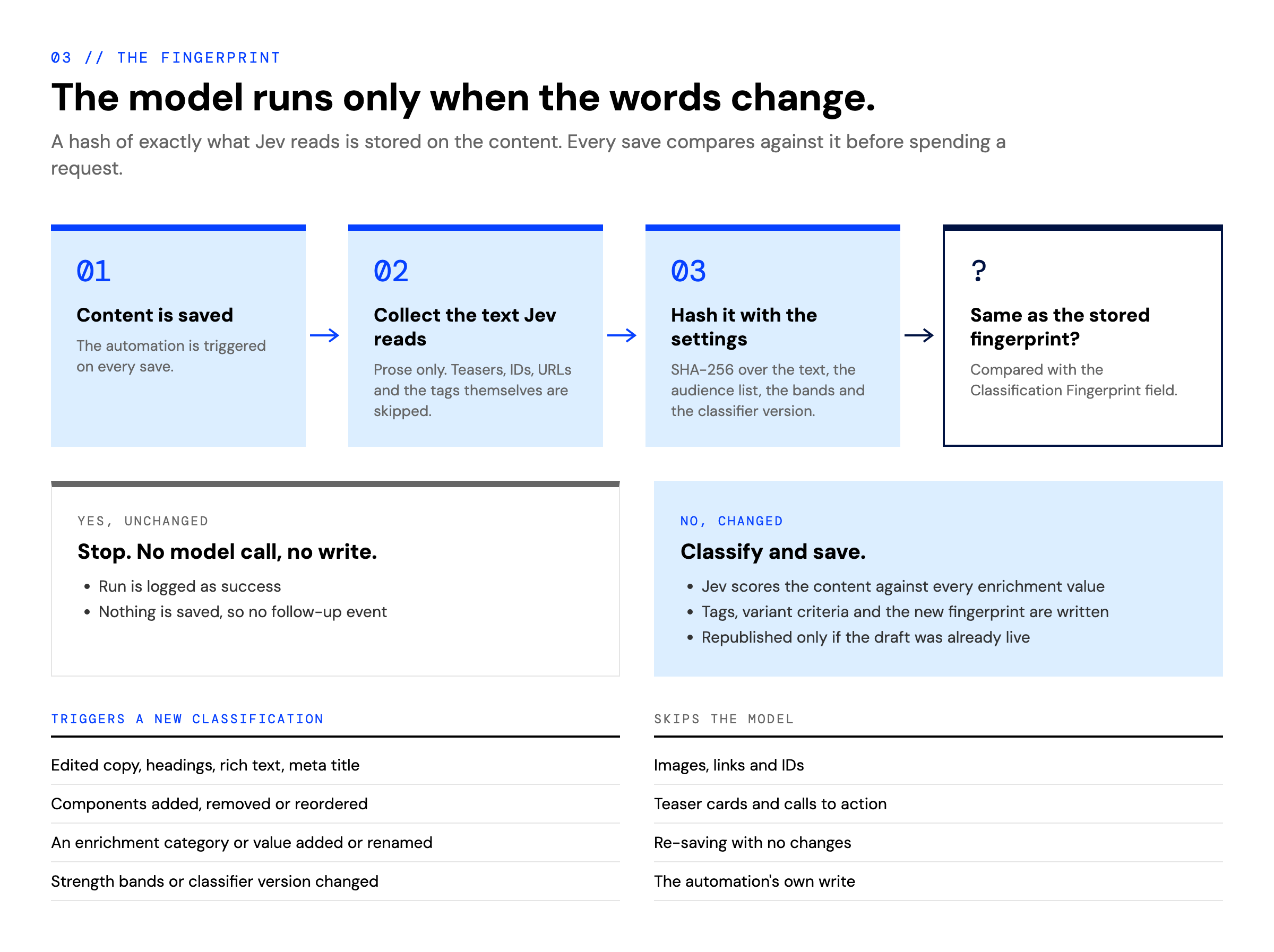
Every save runs the automation, but not every save needs the model. The automation hashes exactly what Jev would read, together with everything that affects the result: the audience list, the strength bands and a classifier version. It stores the hash on the content in a Classification Fingerprint field.
Same hash: nothing relevant changed. The run ends with no model call and no write.
Different hash: Jev classifies the content and the results are written back.
Because the audience list is part of the hash, adding or renaming an enrichment value causes each page to be reclassified on its next save.
From score to enrichment strength
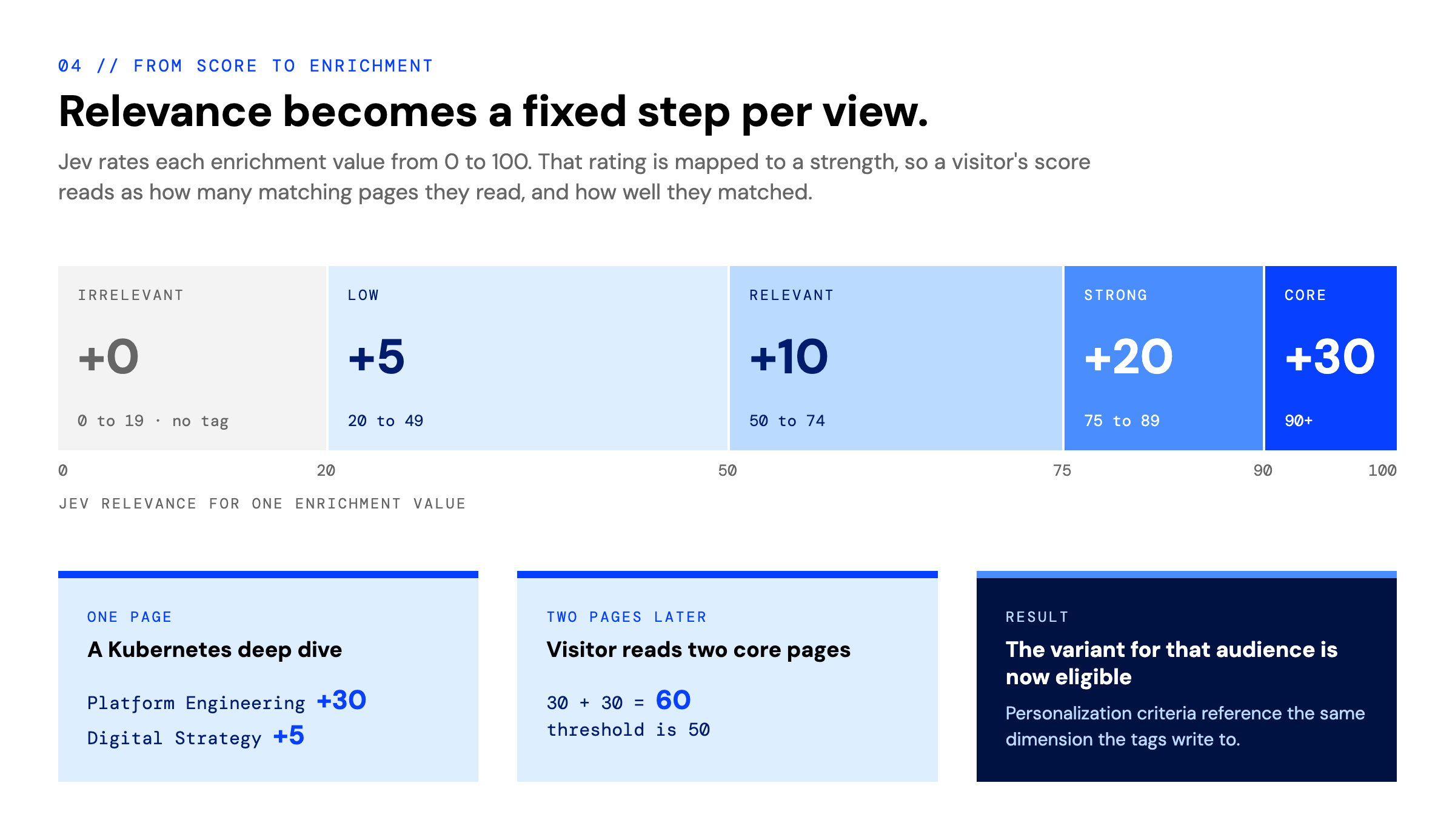
Jev rates each enrichment value from 0 to 100. The automation maps that rating to a fixed strength per view:
Relevance | Match | Strength added per view |
|---|---|---|
0 to 19 | Irrelevant | No tag |
20 to 49 | Low | +5 |
50 to 74 | Relevant | +10 |
75 to 89 | Strong | +20 |
90 to 100 | Core | +30 |
Fixed steps make scores easy to interpret ("two core reads") and stop a single page view from swinging a visitor's profile. With a personalization threshold of 50, a visitor qualifies after two core reads, or after a core, a strong and a low read (30 + 20 + 5).
Publishing
Tags are saved into the draft. If the draft already matched the published version (for example after Save & Publish), the automation republishes so the live page has its tags straight away. It never publishes anything an author hadn't already published.
6. Compositions and entries
The code in this article classifies compositions. The same approach works for entries:
Compositions | Entries | |
|---|---|---|
Trigger |
|
|
Client |
|
|
Where tags go | The page's | An Enrichment field on the content type |
How they reach visitors |
| On a dynamic page, connect a component's enrichment parameter to the entry's Enrichment field with a dynamic token |
Entries suit dynamic compositions, where one template page renders many entries (articles, products, sessions). The entry carries its own classification, and the page passes it on to whichever entry is shown. Section 7 includes the changes needed for entries.
7. How-to: build it
Prerequisites
A Uniform project with Automations enabled (Enterprise plan), and the Manage Automations permission.
A Vercel AI Gateway key, used to call Jev.
Uniform packages at 20.80 or later. The
uniform automationCLI command and@uniformdev/automations-sdkneed them.At least one enrichment category with values in your project. These are the audiences Jev scores against. Set each category's cap well above the per-view strengths (1000 works well), or scores fill up after a few reads and stop telling visitors apart.
npm i @uniformdev/canvas@^20.80.2 @uniformdev/context@^20.80.2 \
      @uniformdev/automations-sdk@^20.80.2 ai
npm i -D @uniformdev/cli@^20.80.2
If your project uses AI SDK 7, npm rejects the automations SDK's optional peer dependency on ai@^6. That peer is only needed for the SDK's Scout client, which this automation doesn't import. Point it at your own version in package.json:
"overrides": {
  "@uniformdev/automations-sdk": { "ai": "$ai" }
}
Step 1: Load the audiences from Uniform
Read every enrichment value from the Enrichments API. The published Context manifest isn't enough: it only lists each category's cap, not its values.
Write this module, and the classifier in Step 2, without Node-only APIs. The automation runs in a web-worker style sandbox with a 1 MB bundle limit, and the same code can then also run in your site.
// utils/audiences.ts
import { EnrichmentClient, type ClientOptions } from "@uniformdev/context/api";

export type Audience = {
  id: string;           // context dimension: `${category}_${value}`
  category: string;     // enrichment category id (the tag's `cat`)
  key: string;          // enrichment value id (the tag's `key`)
  name: string;         // value display name, e.g. "Platform Engineering"
  categoryName: string; // category display name, e.g. "Content Interests"
};

type Sortable = { sortOrder?: number | null };
const bySortOrder =
  <T extends Sortable>(name: (item: T) => string) =>
  (a: T, b: T) =>
    (a.sortOrder ?? Number.MAX_SAFE_INTEGER) -
      (b.sortOrder ?? Number.MAX_SAFE_INTEGER) || name(a).localeCompare(name(b));

export const fetchAudiences = async (options: ClientOptions): Promise<Audience[]> => {
  const { enrichments } = await new EnrichmentClient({ ...options, bypassCache: true }).get();

  const audiences = [...enrichments]
    .sort(bySortOrder((category) => category.name))
    .flatMap((category) =>
      [...category.values]
        .sort(bySortOrder((value) => value.value))
        .map((value) => ({
          id: `${category.id}_${value.id}`,
          category: category.id,
          key: value.id,
          name: value.value,
          categoryName: category.name,
        }))
    );

  if (audiences.length === 0) {
    throw new Error("This project has no enrichment values to classify against");
  }
  return audiences;
};
Step 2: Ask Jev typed questions
Build one score question per enrichment value and one choice question, then send them with the content in a single evaluate call. The questions are built on every call, because the audience list can change.
// utils/jevCore.ts (excerpt)
import { experimental_evaluate as evaluate } from "ai";

export const JEV_MODEL_ID = "typesafe-ai/jev";

const RELEVANCE_RUBRIC = [
  "irrelevant: nothing in the content speaks to this audience",
  "tangential: only incidental overlap with this audience",
  "relevant: some content clearly addresses this audience",
  "core: the content is written primarily for this audience",
] as const;

const PRIMARY_AUDIENCE_QUESTION = "_primaryAudience";

const describeAudience = ({ name, categoryName }: Audience) =>
  `readers interested in ${name} (${categoryName})`;

const buildQuestions = (audiences: Audience[]) => ({
  ...Object.fromEntries(
    audiences.map((audience) => [
      audience.id,
      {
        type: "score" as const,
        instructions: {
          task: `Rate how relevant this web page content is to the "${audience.name}" audience.`,
          audience: describeAudience(audience),
        },
        criteria: RELEVANCE_RUBRIC,
      },
    ])
  ),
  [PRIMARY_AUDIENCE_QUESTION]: {
    type: "choice" as const,
    instructions: "Which single audience is this web page content primarily written for?",
    criteria: Object.fromEntries(
      audiences.map((audience) => [audience.id, describeAudience(audience)])
    ),
  },
});

const result = await evaluate({
  model, // passed in by the caller (see Step 5)
  state: {
    variant: target.label,
    content: target.blocks.map(({ component, text }) => ({ component, text })),
  },
  questions: buildQuestions(audiences),
  providerOptions: { gateway: { zeroDataRetention: true } },
});

// result.answers[audience.id].score               → 0..3 on the rubric; rescale to 0..100
// result.answers[PRIMARY_AUDIENCE_QUESTION].choice → the best-fit audience id
Enrichment values in Uniform have a name but no description, so the value's name is all Jev knows about each audience. Use specific names: "Platform Engineering" scores better than "Tech".
Step 3: Fingerprint what Jev reads
Hash the collected text together with everything that affects the result. crypto.subtle is available in both the automation sandbox and Node.
export const fingerprintTargets = async (targets: ClassificationTarget[], audiences: Audience[]) => {
  const material = JSON.stringify([
    CLASSIFIER_VERSION, // bump when scoring logic changes
    JEV_MODEL_ID,
    audiences.map(({ id, name, categoryName }) => [id, name, categoryName]),
    PERSONALIZATION_SCORE_THRESHOLD,
    ENRICHMENT_STRENGTH_BANDS,
    targets.map((t) => [t.id, t.label, t.blocks.map((b) => b.text)]),
  ]);
  const digest = await crypto.subtle.digest("SHA-256", new TextEncoder().encode(material));
  return Array.from(new Uint8Array(digest), (b) => b.toString(16).padStart(2, "0")).join("");
};
Add a field to store it on your page component (or content type), so the editor doesn't flag it as an orphan parameter:
# uniform-data/component/page.yaml (parameters)
  - id: classificationFingerprint
    name: Classification Fingerprint
    helpText: Set by the classify-composition automation. Do not edit.
    type: text
    typeConfig:
      required: false
Step 4: Turn scores into enrichment tags
export const ENRICHMENT_STRENGTH_BANDS = [
  { min: 90, strength: 30 }, // core
  { min: 75, strength: 20 }, // strong
  { min: 50, strength: 10 }, // relevant
  { min: 20, strength: 5 },  // low
] as const;

export const toEnrichmentStrength = (score: number) =>
  ENRICHMENT_STRENGTH_BANDS.find(({ min }) => score >= min)?.strength ?? 0;

export const toEnrichmentTags = (classification: CompositionClassification | null, audiences: Audience[]) =>
  classification
    ? audiences
        .map(({ id, category, key }) => ({
          cat: category,
          key,
          str: toEnrichmentStrength(classification.pageScores[id] ?? 0),
        }))
        .filter((tag) => tag.str > 0)
    : [];
Strengths must be whole numbers: the visitor cookie drops fractions.
Step 5: Write the automation
Each *.automation.ts file deploys as one automation, and the file name becomes its ID.
// automations/classify-composition.automation.ts (condensed)
import { defineAutomation } from "@uniformdev/automations-sdk";
import {
  ApiClientError,
  CANVAS_PUBLISHED_STATE,
  CompositionManagementClient,
} from "@uniformdev/canvas";
import { createGateway } from "ai";

/** A team role that can read enrichments and read, save and publish compositions. */
const AUTOMATION_ROLE = "developer";

export default defineAutomation({
  metadata: {
    name: "Classify composition with Jev",
    description:
      "Scores a saved page against every enrichment value with Jev and stores the result as enrichment tags.",
    // The filter drops other composition types before a run is created.
    triggers: [{ type: "composition.changed", filter: 'input.type == "page"' }],
    permissions: { role: AUTOMATION_ROLE },
  },
  handler: async ({ input, log, uniformCredentials }) => {
    // Only UNIFORM_ENV_* variables reach an automation. They are added to the
    // bundle at deploy time, so read them as literal property accesses.
    const apiKey = process.env.UNIFORM_ENV_AI_GATEWAY_API_KEY;
    if (!apiKey) {
      log.error("UNIFORM_ENV_AI_GATEWAY_API_KEY is not configured; set it and redeploy.");
      return { outcome: "failure" };
    }

    const audiences = await fetchAudiences(uniformCredentials);
    const owned = new Set(audiences.map(({ category }) => category));

    const compositions = new CompositionManagementClient(uniformCredentials);
    const selector = {
      compositionId: input.id,
      editionId: input.editionId,
      releaseId: input.trigger?.type === "release" ? input.trigger.id : undefined,
    };

    // The editor format includes pattern content and is safe to save back.
    // Saving a delivery-format read would unlink patterns.
    const draft = await compositions.get({ ...selector, format: "editor" });
    const composition = draft.composition;

    // If the author's latest copy is already published, republish after writing.
    const published = await compositions
      .get({ ...selector, format: "editor", state: CANVAS_PUBLISHED_STATE })
      .catch((error) => {
        if (error instanceof ApiClientError && error.statusCode === 404) return null;
        throw error;
      });
    const draftIsLive =
      published !== null && authoredShape(published.composition) === authoredShape(composition);

    const targets = collectClassificationTargets(composition);
    const fingerprint = await fingerprintTargets(targets, audiences);
    if (fingerprint === composition.parameters?.classificationFingerprint?.value) {
      log.info(`Composition ${input.id} copy is unchanged; skipping Jev.`);
      return { outcome: "success" };
    }

    const classification = await classifyTargets(composition, targets, {
      audiences,
      model: createGateway({ apiKey }).evaluationModel(JEV_MODEL_ID),
    });

    mergeEnrichmentTags(composition, toEnrichmentTags(classification, audiences), owned);
    if (classification) applyClassCriteria(composition, classification);
    setFingerprint(composition, fingerprint);

    const { projectId, uiStatus, ...body } = draft;
    try {
      const save = draftIsLive ? compositions.saveAndPublish : compositions.save;
      await save.call(compositions, { ...body, composition }, {
        ifUnmodifiedSince: draft.modified,
      });
    } catch (error) {
      if (error instanceof ApiClientError && error.statusCode === 409) {
        // The author saved again while Jev was scoring. That save will run the
        // automation again on the newer copy.
        log.warning(`Composition ${input.id} changed during classification; skipping.`);
        return { outcome: "success" };
      }
      throw error;
    }

    log.info(`Composition ${input.id} classified${draftIsLive ? " and republished" : ""}.`);
    return { outcome: "success" };
  },
});
The helpers referred to above:
collectClassificationTargetswalks the composition and returns the units to score: the content every visitor sees, plus each personalization variant. It skips the content listed in "What Jev reads".classifyTargetsruns the Step 2 call for each unit in parallel and returns the page's scores.mergeEnrichmentTagsreplaces tags in the categories it classifies and keeps the rest. Because it classifies every category, hand-added tags on a classified page are replaced. Authors who want to tag a page by hand can tick a Disable Classification checkbox, which the automation respects.applyClassCriteriapoints each personalization variant's criteria at the audience Jev picked as its best fit, for examplecontent-interests_platform-engineering > 50.authoredShapecompares two compositions while ignoring the tags and the fingerprint.
Step 6: Classify entries instead
For entries, change the trigger, the client and where the tags are written:
import { EntryManagementClient, convertEntryToPutEntry } from "@uniformdev/canvas";

/** The Enrichment field on your content type, and a text field for the fingerprint. */
const ENRICHMENT_FIELD = "enrichments";
const FINGERPRINT_FIELD = "classificationFingerprint";

// metadata.triggers:
//   [{ type: "entry.changed", filter: 'input.type == "article"' }]

const entries = new EntryManagementClient(uniformCredentials);
const fresh = await entries.get({ entryId: input.id, pattern: "any", editionId: input.editionId });
const entry = fresh.entry;

// Classify the entry's fields as if they were a component's parameters, leaving
// out the fields this automation writes.
const {
  [ENRICHMENT_FIELD]: _tags,
  [FINGERPRINT_FIELD]: _fingerprint,
  ...fields
} = entry.fields ?? {};
const targets = collectClassificationTargets({
  type: entry.type,
  _id: entry._id,
  _name: entry._name,
  parameters: fields,
} as RootComponentInstance);

// ...fingerprint and classify exactly as for compositions...

entry.fields = {
  ...entry.fields,
  // Keep the field's existing type; only replace its value.
  [ENRICHMENT_FIELD]: { ...entry.fields?.[ENRICHMENT_FIELD], value: toEnrichmentTags(classification, audiences) },
  [FINGERPRINT_FIELD]: { type: "text", value: fingerprint },
};

await entries.save(convertEntryToPutEntry(fresh), { ifUnmodifiedSince: fresh.modified });
On the dynamic composition that renders these entries, connect the component's enrichment parameter to the entry's Enrichment field using a dynamic token. Each visitor is then enriched with the tags of the entry they're reading.
Step 7: Deploy
Add the gateway key to .env with the UNIFORM_ENV_ prefix. The CLI reads .env and adds the value to the bundle at deploy time, so redeploy after rotating the key.
# .env
UNIFORM_ENV_AI_GATEWAY_API_KEY=<your AI Gateway key>
# The deploy also uses UNIFORM_CLI_API_KEY (or UNIFORM_API_KEY) and UNIFORM_PROJECT_ID.
# That key needs the Manage Automations permission.
npx uniform automation deploy ./automations
npx uniform automation list   # classify-composition should be listed
Deployed code can't be read back out. Renaming the file deploys a new automation; remove the old one with npx uniform automation delete <id>.
You don't need to change how your site renders. UniformComposition already applies $enr tags when a component comes into view:
<UniformContext context={context}>
  <UniformComposition data={composition} />
</UniformContext>
8. Verify, troubleshoot and limits
Verify
Change a sentence on a page in Uniform and save.
Open the automation's run history. You should see:
success, with a log such as
1 unit(s) scored, 1364 tokens; tags content-interests/platform-engineering+30, content-interests/digital-strategy+5;cycleAborted, with 0 ms latency. This is the automation's own save being ignored, which is expected.
On the page, the Context tab lists the tags, and Classification Fingerprint has a value.
Save again without changing anything. The log says the copy is unchanged and Jev was skipped, and no
cycleAbortedfollows.Publish, view the page, and check the Uniform Context devtools. The visitor's scores go up by the tag strengths.
Troubleshooting
Symptom | Cause | Fix |
|---|---|---|
"Enrichment no longer exists" on the Context tab | A tag points at a category or value that isn't in the project | Let the automation load audiences from the Enrichments API (Step 1) instead of hardcoding them |
"Orphan Parameter: classificationFingerprint" | The fingerprint field isn't defined on the component | Add it to the component definition (Step 3) |
| The key wasn't in the environment when you deployed | Add it to |
| The automation's role can't read enrichments, or the project has no enrichment values | Grant the role access, or add values to a category |
| The automation's own save being ignored | Expected; nothing to do |
Every audience ends up with the same share | A category's cap is too low, so scores fill up | Raise the cap to about 1000 |
Tags saved, but the live page doesn't have them | The draft had unpublished changes, so only the draft was updated | Publish the page |
Limits
Limit | Value | What it means for this automation |
|---|---|---|
Bundle size | 1 MB | About 280 KB, including the AI SDK |
Outbound requests per run | 100 | 3 reads, 1 or 2 writes, and 1 Jev call per unit (the page plus each variant) |
CPU and wall-clock time per run | 5 min and 15 min | A typical run takes 1 to 3 seconds |
Chain depth | 4 automations | Only relevant if other automations react to this one's writes |
Run history | 7 days | Log IDs and outcomes, never keys or whole payloads |
Patterns: saving a pattern raises an event for the pattern only. Pages that use it keep their tags until they are saved again.
9. Learn more
Uniform Automations documentation: triggers, code automations, Scout automations, best practices and limits. docs.uniform.app/docs/guides/automations
Uniform agent skills: the
uniformdev/agent-skillsrepository includes auniform-automationsskill. Give it to your coding agent and it will help you design, write, review and test automations like this one, following Uniform's recommended patterns.Enrichments: how tags, categories and caps work. docs.uniform.app/docs/guides/classification/enrichments